

Table of Contents
String Comparison in C#
String comparison in C# isn’t just about equality – it has a direct impact on performance, correctness, and even behaviour across different cultures.
In my previous article on FrozenDictionary in C#: Supercharging Speed of Redirect Lookups, we saw how small inefficiencies in string handling can quickly snowball under load. At the centre of that problem is something most developers don’t think about: how string comparisons actually behave.
.NET provides multiple comparison strategies, each with very different performance characteristics and correctness implications. Choose the wrong one, and you introduce subtle bugs, unnecessary allocations, and avoidable slowdowns in hot paths.
In this post, we’ll break down why string comparisons aren’t all the same, where those costs come from, and how modern versions of .NET handle equality and hashing. Join me on a string comparison journey and discover why most string comparisons in application code should use StringComparison.Ordinal, or StringComparison.OrdinalIgnoreCase.
String Comparison Demo Project
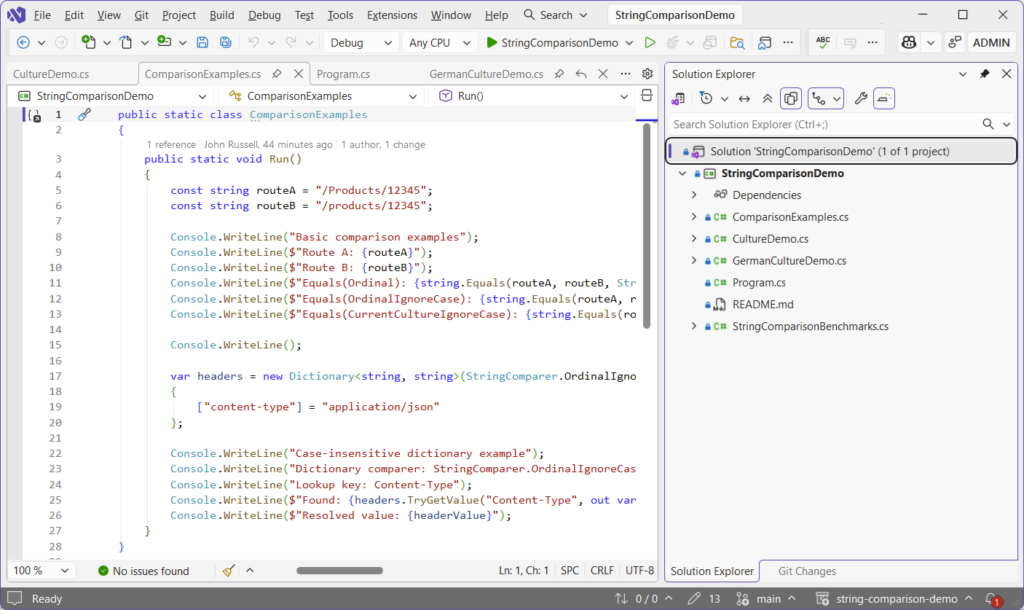
All of the code below can be found in my GitHub String Comparison Demo project, with runnable benchmarks and examples including StringComparison.Ordinal, StringComparison.OrdinalIgnoreCase, and StringComparison.CurrentCulture.
And if you’ve not benchmarked your own code yet, you should! I covered how to do that properly using the super simple BenchmarkDotNet here: BenchmarkDotNet in .NET 10: Writing Proper Benchmarks.
Why String Comparisons Matter
Whatever you’re building, string comparisons are everywhere. They’re part and parcel of everyday development and are integral to things like routing, redirects, and query strings – the list goes on.
They’re not one-off operations either. They happen thousands of times across the lifetime of your application. That means that even small inefficiencies can add up quickly. But performance is only half the story. If your comparisons are culture-dependent, your system can behave differently depending on where it runs.
And that’s where things get interesting.
Under the hood, not all string comparisons are created equal. Ordinal comparisons operate directly on the underlying UTF-16 code units, meaning they’re effectively comparing numeric values in memory. Culture-aware comparisons, on the other hand, rely on collation rules defined by the runtime, which can involve case mappings, diacritics, and even multi-character equivalence. That extra intelligence comes at a cost: more CPU work, more branching, and sometimes surprising results.
A Common Mistake: Normalising Strings Before Comparing
If you’re comparing two strings, don’t make this mistake:
if (a.ToLower() == b.ToLower())
{
    // match
}It looks clean and safe on the face of it. There won’t typically be any warnings in your IDE because it appears a perfectly reasonable operation. Interestingly, it isn’t.
The approach both transforms both strings, then compares that transformed result – an operation that isn’t free. It allocates memory and ‘walks’ the entire string. The real problem, though, is that it introduces culture-dependent behaviour.
The Hidden Allocation Cost of ToLower()
There’s another problem here that’s easy to miss.
Every call to ToLower() or ToUpper() creates a new string instance.
Strings in .NET are immutable, so even if the contents are identical, the runtime still has to allocate a completely new object on the heap.
That means this is doing two things you probably didn’t intend:
if (input.ToLower() == "admin")First, it’s allocating a brand new string every time. Second, it’s adding pressure to the GC to clean it up later. Now scale that up to a hot path, a loop over thousands of items, or a high-throughput API, and it starts to matter.
Using StringComparison avoids all of this entirely. No allocations, no copies, just a direct comparison over the existing memory.
Culture Can Change Your Results
By default, ToLower() in C# uses the current culture. That means that this doesn’t always produce the same result:
input.ToLower()From the demo project, take a look at the Turkish example in CultureDemo.cs:
const string input = "FILE";

Thread.CurrentThread.CurrentCulture = turkish;
Console.WriteLine($"Current culture: {CultureInfo.CurrentCulture.Name}");
Console.WriteLine($"ToLower() fast path: {input.ToLower()}");
Console.WriteLine($"ToLower(tr-TR): {input.ToLower(turkish)}");
Console.WriteLine($"Equals(CurrentCultureIgnoreCase, \"FILE\", \"file\"): {string.Equals("FILE", "file", StringComparison.CurrentCultureIgnoreCase)}");
Console.WriteLine($"Equals(OrdinalIgnoreCase, \"FILE\", \"file\"): {string.Equals("FILE", "file", StringComparison.OrdinalIgnoreCase)}");This outputs the following in the console:
Current culture: tr-TR
ToLower() fast path: fıle
ToLower(tr-TR): fıle
Equals(CurrentCultureIgnoreCase, "FILE", "file"): False
Equals(OrdinalIgnoreCase, "FILE", "file"): True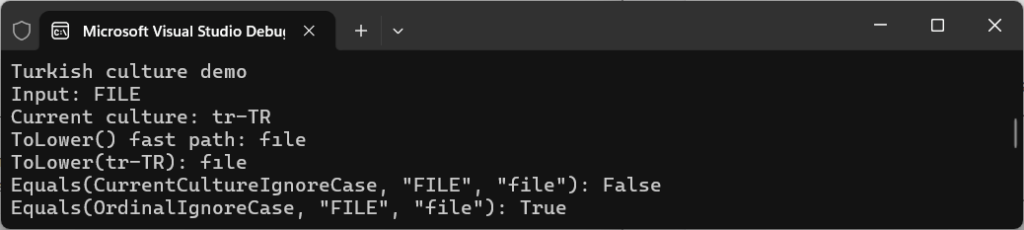
You’re not just getting a different string back from ToLower(). You’re getting a different comparison result.
The reason for this is because, under Turkish culture:
"FILE"is not equal to"file"usingCurrentCultureIgnoreCase- but it IS equal using
OrdinalIgnoreCase
This is the same input, with the same intent – but the behaviour is completely different.
When you rely on culture-aware operations for technical data, you’re introducing variability into something that should be completely deterministic and predictable.
Take the German character “ß” (Eszett). In some cultural comparisons, it’s considered equivalent to “ss”. That means a case-insensitive culture-aware comparison might treat “straße” and “strasse” as equal, even though their binary representations are completely different. Ordinal comparisons won’t do that – they treat every code unit literally. That difference alone can break lookups, authentication checks, or caching layers if you’re not deliberate about your choice. We’ll revisit the “ß” problem later.
Uncertainty is the key here though, because where there’s uncertainty there’s often misunderstanding, and that’s where defects creep into production code.
In distributed systems, culture-sensitive comparisons can introduce subtle inconsistencies between environments. A comparison that works perfectly on a developer machine can behave differently in production if the underlying culture changes.
This is exactly why ordinal comparisons are the default choice for identifiers, keys, and protocol-level data.
StringComparison in C#: Ordinal vs Culture Explained
Choosing between using ordinal and culture depends on your use case, so let’s take a look at the simple example from ComparisonExamples.cs:
Console.WriteLine($"Equals(Ordinal): {string.Equals(routeA, routeB, StringComparison.Ordinal)}");
Console.WriteLine($"Equals(OrdinalIgnoreCase): {string.Equals(routeA, routeB, StringComparison.OrdinalIgnoreCase)}");
Console.WriteLine($"Equals(CurrentCultureIgnoreCase): {string.Equals(routeA, routeB, StringComparison.CurrentCultureIgnoreCase)}");The console outputs the following:
Equals(Ordinal): False
Equals(OrdinalIgnoreCase): True
Equals(CurrentCultureIgnoreCase): True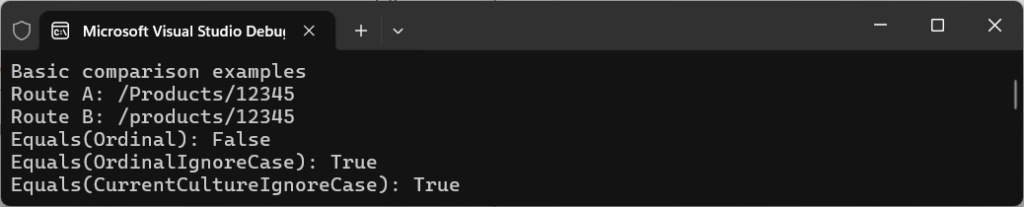
Although StringComparison.OrdinalIgnoreCase and CurrentCultureIgnoreCase look interchangeable, they’re not. There’s a different intent.
Ordinal comparison means you’re comparing raw character values directly, without applying language rules. This is exactly what you want when comparing values for HTTP headers, routing, query strings, and keys etc.
What’s important to remember here is that these aren’t human language – they’re identifiers.
So instead of normalising or relying on culture, you simply just do this:
string.Equals(routeA, routeB, StringComparison.OrdinalIgnoreCase);This results in no allocations, no transformations, and no surprising results. And it’s why, in most cases, StringComparison.OrdinalIgnoreCase is the safest and fastest option for case-insensitive string comparison in C#.
What Actually Happens Under the Hood
At a high level, Ordinal and culture-based comparisons behave very differently.
StringComparison.Ordinal is essentially a byte-by-byte comparison of the underlying UTF-16 data. It’s fast, predictable, and doesn’t care about linguistic rules.
Culture-based comparisons like CurrentCulture are a different beast entirely.
They use the runtime’s globalisation libraries to perform linguistic comparisons, which means:
- Case mappings are culture-aware
- Characters can be treated as equivalent depending on language rules
- Comparisons may involve collation and normalisation logic
On modern .NET, this is powered by ICU (International Components for Unicode) on most platforms. That’s great for correctness in user-facing scenarios, but it comes with extra cost. You’re no longer comparing raw data, you’re asking the runtime to interpret it.
That’s why Ordinal is almost always the right default unless you explicitly need culture-aware behaviour.
Why OrdinalIgnoreCase Performs So Well
One of the reasons StringComparison.OrdinalIgnoreCase performs so well is that it avoids full string normalisation.
Instead of allocating new strings or applying full Unicode casing rules, the runtime uses optimised internal logic to compare characters in a case-insensitive way.
For ASCII input, this can be extremely fast, often reduced to simple transformations at the character level. Even for non-ASCII input, the runtime avoids allocations and performs comparisons directly over existing memory.
That means you get case-insensitive behaviour without paying the cost of:
- Allocating new strings;
- Copying data;
- Performing full culture-aware transformations.
And it’s the reason why approaches like this are consistently slower, even before GC pressure is taken into account:
input.ToLower() == other.ToLower()Internally, the runtime avoids allocating intermediate strings and instead performs comparisons directly over spans of memory. In lots of cases, especially for ASCII input, comparisons can be reduced to simple bitwise transformations, which keeps the operation both branch-light and allocation-free.
How StringComparison Affects Dictionary Performance in C#
String comparison plays an important part in collections too.
From the same demo file (ComparisonExamples.cs), check out the headers example:
var headers = new Dictionary<string, string>(StringComparer.OrdinalIgnoreCase)
{
	["content-type"] = "application/json"
};

Console.WriteLine($"Found: {headers.TryGetValue("Content-Type", out var headerValue)}");
Console.WriteLine($"Resolved value: {headerValue}");The output shows that, despite casing differences, a match is found and the value is resolved:
Found: True
Resolved value: application/json
That StringComparer.OrdinalIgnoreCase isn’t just about comparison. It controls how keys are hashed as well.
Dictionaries rely on both Equals and GetHashCode, and both of them must agree – if two values are considered equal, their hash code must be the same, otherwise the lookup won’t work.
This approach works really well by letting the runtime handle both equality and hashing at the same time.
For case-insensitive key lookups, StringComparer.OrdinalIgnoreCase is usually the right string comparer for Dictionary in C#.
Hashing and Dictionaries
When you use a dictionary with strings, you’re not just choosing how equality works – you’re also choosing how hash codes are generated. A dictionary using StringComparer.OrdinalIgnoreCase must produce identical hash codes for values that differ only by case.
That means additional work during both insertion and lookup. If you accidentally mix comparers, or rely on defaults without understanding them, you can end up with subtle bugs where keys that “look equal” aren’t actually found.
Real-World Example: Redirects Lookup
Let’s think back to my previous article on FrozenDictionary in C#: Supercharging Speed of Redirect Lookups (if you haven’t read it yet, it’s a must-read for performance tuning redirect solutions).
A common implementation might look something like this:
var key = requestPath.ToLowerInvariant();
redirects.TryGetValue(key, out var target);That will work, but it’s doing extra legwork that comes at a cost in:
- Allocating a new string.
- Duplicating logic.
- Relying on transformation.
Now we understand how dictionaries use hashing, a simpler approach becomes:
var redirects = new Dictionary<string, string>(StringComparer.OrdinalIgnoreCase);

redirects.TryGetValue(requestPath, out var target);This is cleaner, faster, and more consistent because the dictionary uses the same comparer for both equality and hashing. You avoid allocating a lower-cased copy of the key on every lookup, and keep the comparison rules in one place instead of duplicating them across your code.
Benchmarking String Comparisons in C# with BenchmarkDotNet
Let’s look at some actual numbers, where we test StringComparison.Ordinal, StringComparison.OrdinalIgnoreCase, and StringComparison.CurrentCulture usage techniques against each other to determine which comes out on top. If you’re new to BenchmarkDotNet, check out my post on BenchmarkDotNet in .NET 10: Step-by-Step with 5 Real C# Benchmarks, which guides you through a really simple setup.
Understanding a little about what goes on at runtime level, you’ll now hopefully understand why some score better than others.
We’ll run these benchmarks, as defined in StringComparisonBenchmarks.cs:
[Benchmark]
public bool OrdinalIgnoreCase_Equals()
    => string.Equals(ValueA, ValueB, StringComparison.OrdinalIgnoreCase);

[Benchmark]
public bool ToLowerInvariant_Equals()
    => ValueA.ToLowerInvariant() == ValueB.ToLowerInvariant();

[Benchmark]
public bool Dictionary_OrdinalIgnoreCase()
    => _ordinalIgnoreCaseDictionary.TryGetValue(ValueB, out _);

[Benchmark]
public bool Dictionary_ToLowerInvariant()
{
    var key = ValueB.ToLowerInvariant();
    return _lowercaseDictionary.TryGetValue(key, out _);
}Navigate to the project folder and run the following command to build in release mode and run the benchmarks:
dotnet run -c Release --benchmarkThe tests should take under five minutes to complete, depending on the hardware you’re using. You’ll see an output window running through each of the tests:
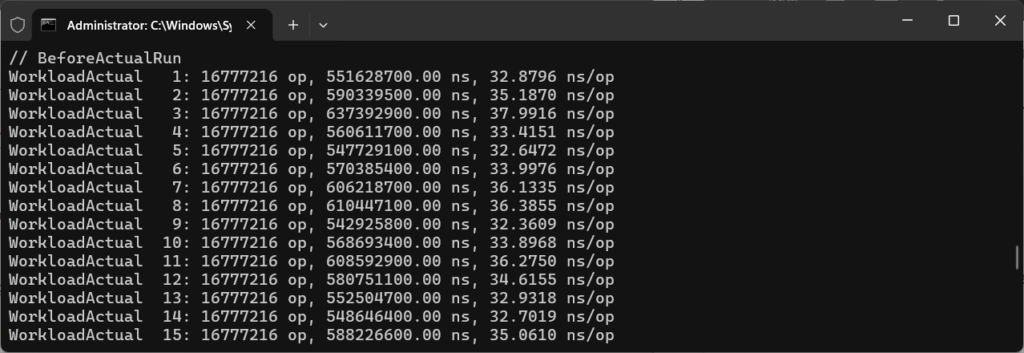
String Comparison Results
Following a successful run, results will be displayed in a neat table and outputted to a folder called BenchmarkDotNet.Artifacts, off your project folder.
Below is what a successful run looks like:
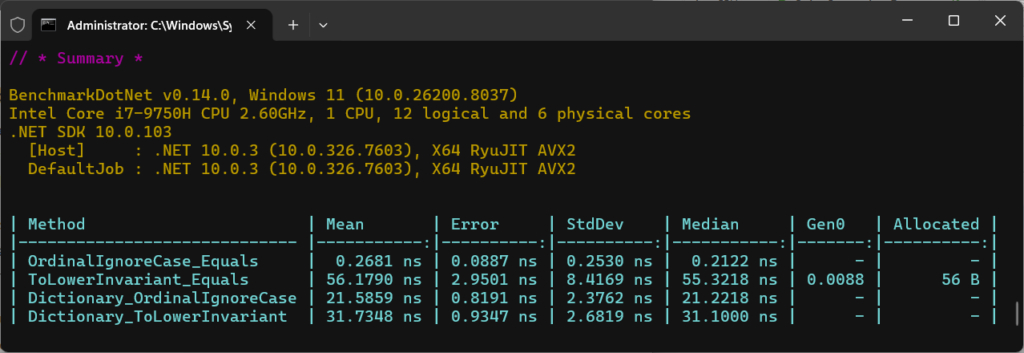
Let’s take a closer look at the numbers produced:
| Method | Mean | Allocated |
OrdinalIgnoreCase_Equals | 0.26 ns | 0 B |
ToLowerInvariant_Equals | 56.17 ns | 56 B |
ToLowerInvariant_Equals | 21.58 ns | 0 B |
Dictionary_ToLowerInvariant | 31.73 ns | 0 B |
OrdinalIgnoreCase
OrdinalIgnoreCase appears extremely fast here, but it’s important to interpret these numbers correctly.
When BenchmarkDotNet reports sub-nanosecond timings, it usually means the operation is being in-lined or optimised so aggressively that it approaches the limits of measurement precision.
The key takeaway isn’t the exact number – it’s the relative difference. OrdinalIgnoreCase avoids allocations and additional processing, while approaches like ToLowerInvariant() introduce both CPU overhead and memory pressure.
So the focus is on the trend, not the absolute values reported.
ToLowerInvariant()
ToLowerInvariant() is doing quite a bit more work, which you can see in both time and allocations.
Importantly here, using a comparer in a dictionary is faster than manually normalising keys. It avoids unnecessary work entirely and scales super efficiently.
The performance gap isn’t accidental. Ordinal comparisons are tight loops over contiguous memory and are heavily optimised by the runtime. On modern CPUs, these comparisons can be vectorised, allowing multiple characters to be processed in a single instruction.
Culture-aware comparisons can’t benefit from these optimisations in the same way, because they rely on lookup tables, branching, and locale-specific rules. That’s why the difference becomes more pronounced as string length increases.
When NOT to Use OrdinalIgnoreCase
While OrdinalIgnoreCase is often the right default, it’s not always appropriate. If you’re displaying or sorting text for users, especially in multilingual applications, culture-aware comparisons are usually the correct choice. Users expect “ä” to behave like “a” in some contexts, but not others. The key is intent: ordinal for identifiers and infrastructure, culture-aware for human-facing behaviour.
An Edge Case: Playing by the Runtime’s Rules
There’s always nuance to every rule.
Thinking back to German lessons in school, we were always taught that the character “ß” could be substituted by “ss” – as in the word straße (English: street). So how does the .NET runtime deal with this type of string comparison in 2026?
Let’s run the code in GermanCultureDemo.cs to compare the words straße and STRASSE to find out:
Console.WriteLine($"Equals(CurrentCultureIgnoreCase): {string.Equals(lower, upper, StringComparison.CurrentCultureIgnoreCase)}");
Console.WriteLine($"Equals(OrdinalIgnoreCase): {string.Equals(lower, upper, StringComparison.OrdinalIgnoreCase)}");
Console.WriteLine($"Compare(ignoreCase: true, current culture) == 0: {string.Compare(lower, upper, true, CultureInfo.CurrentCulture) == 0}");It uses the words in lower- and upper-case for flavour, but essentially we’re testing whether .NET equates them as the same using CurrentCultureIgnoreCase, OrdinalIgnoreCase, as well as string.Compare.
The output teaches a different lesson:
False
False
False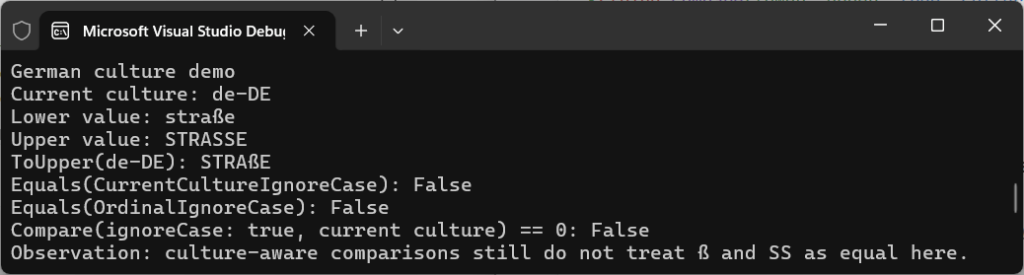
Even culture-aware comparisons don’t behave in the way you’d necessarily expect. straße and STRASSE, though they might look equivalent, they aren’t treated as equal.
The reason for this is because, long ago in the .NET Core 2.0/3.0 era, Microsoft moved from Windows-only globalisation (NLS) to ICU (International Components for Unicode) across their platforms. In Windows NLS, straße and STRASSE were often treated as equal in cases-insensitive, culture-aware comparisons (like CurrentCultureIgnoreCase) in German. But that changed with the move to ICU, around the time of .NET 5.
An important lesson to be learnt, then, to always keep in mind that there’s no built-in AI that acts as a “human text mode”. Strict rules are followed (which can change!), and they might not be the ones you expect.
The important takeaway is that culture-aware comparisons follow really strict rules defined by Unicode and the runtime, not human expectation. If you rely on them for technical comparisons, you’re introducing behaviour that can change across platforms and runtime versions.
Practical Takeaway
If you take one thing from this post, always remember to:
- Use
StringComparison.Ordinalby default - Use
StringComparison.OrdinalIgnoreCasewhen case doesn’t matter - Never normalise strings with
ToLower()orToUpper()for comparison - Use
StringComparer.OrdinalIgnoreCasefor dictionaries and lookups - Only use culture-aware comparisons for user-facing text
If your string represents data, use ordinal. If it represents language, consider culture.
Some examples of what to use and where for comparing:
- IDs, keys, URLs →
Ordinal/OrdinalIgnoreCase - User-facing text →
CurrentCulture/CurrentCultureIgnoreCase - Persisted, normalised data →
InvariantCulture
Final Thoughts
String comparison looks simple on the surface, but it’s one of those areas where small decisions lead to big impacts later. Be specific, and treat strings as data when they’re data, and rely on the comparison tools .NET already optimises for you.
Once you’ve mastered that, your code will become faster, more predictable, and far easier to manage – which is exactly what you want in systems that need to scale.
If you enjoyed what you read, have a go yourself at running your own benchmarking in my String Comparison Demo project on GitHub.
[…] your strings using extension methods such as ToLower(), but remember from my earlier post on C# String Comparison: Performance, Culture, and Hidden Costs that this comes at a performance cost and can be overkill if your application isn’t […]