

Table of Contents
Introducing Dictionary in C#
Dictionary<TKey, TValue> is one of the fastest and most important collections in .NET. Nearly every high-performance C# application relies on dictionaries for fast key-based lookups, caching, routing, and state management.
Dictionary in C# first surfaced with .NET 2.0 in 2005, alongside generics. But .NET already included non-generic key-value collections from its initial 2002 release. It was a huge moment for C# because it replaced older, non-generic collections like Hashtable with type-safe, high-performance alternatives.
Key-value data structures are a fundamental concept, usually implemented as hash tables. They’ve been around for decades:
- Smalltalk (1970s) – had a
Dictionaryclass. - Python (early 1990s) –
dictis a core language feature. - Java (1995) – introduced
Hashtable, later succeeded byHashMap(1998).
So C# didn’t invent the concept, but it built on foundations already laid many years before. And it’s benefited from more than 20 years of iterative optimisation.
At a glance, a dictionary looks like a simple key-value store. In reality, it’s a hash table with very specific performance characteristics. If you’ve read my post on HashSet in C#, you’ll recognise the same underlying mechanics. Conceptually, a dictionary behaves much like a HashSet that also stores a value alongside each key.
C# Dictionary Examples
Throughout this post, we’ll run through examples in the accompanying C# Dictionary demo project.
Clone the GitHub repository and get hands-on by uncommenting relevant examples in the Program.cs for each section. Key code is also included inline throughout the post.
Dictionary Creation
The API to create a new Dictionary object with an int key and string value is really straightforward:
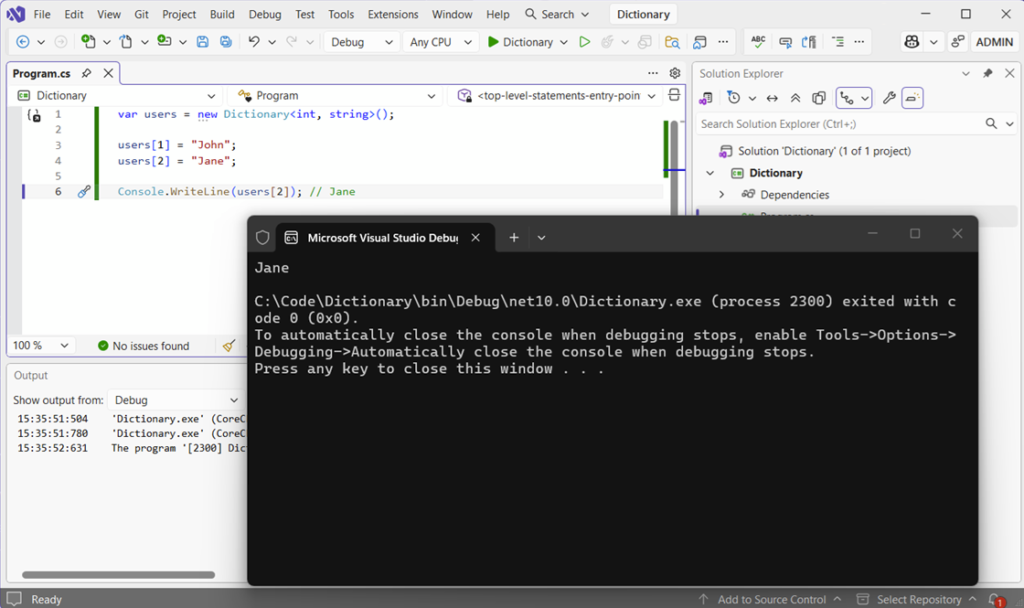
var users = new Dictionary<int, string>();

users[1] = "John";
users[2] = "Jane";

Console.WriteLine(users[2]); // JaneIt looks like indexed access, but it’s not. There’s no scanning through elements, but rather jumping directly to the value.
What Actually Happens on Lookup
When you add or retrieve a value, the dictionary uses hashing to locate it.
The key’s passed through GetHashCode(), producing an integer hash code. The dictionary then maps that hash code to one of its internal buckets. When you look up the key again, the same hash is calculated and the dictionary jumps straight back to that bucket. That’s why lookups are typically O(1), meaning lookup time usually remains close to constant even as the collection grows.
The important detail here is that this is expected behaviour, not guaranteed. It relies on a good hash distribution and correct equality logic.
A Collision Course
Occasionally, different keys can produce the same hash value. When this happens, the dictionary stores multiple entries in the same bucket and then compares them to find the correct one.
If collisions are rare, you won’t notice any difference. But if they become more frequent, lookups start to degrade in performance. This is exactly the same principle explored in HashSet in C#, and it’s why hash quality matters more than most people realise.
Let’s take a look at some example code that forces items into the same bucket by overriding the GetHashCode() method:
namespace Dictionary.Keys;

public sealed class BadKey
{
    public string Value { get; }

    public BadKey(string value)
    {
        Value = value;
    }

    public override bool Equals(object? obj)
    {
        return obj is BadKey other && Value == other.Value;
    }

    public override int GetHashCode()
    {
        // Bad hash function, forcing items into the same bucket.
        return 1;
    }
}
Now, let’s create a new dictionary of type BadKey and see what happens:
var dict = new Dictionary<BadKey, int>();

dict[new BadKey("apple")] = 1;
dict[new BadKey("banana")] = 2;
dict[new BadKey("grape")] = 3;
dict[new BadKey("orange")] = 4;

// Lookup still works because Equals is implemented correctly.
var value = dict[new BadKey("grape")];
Console.WriteLine(value);Instead of randomly allocating to a number of different buckets based on the hash code created, all four fruits are stored in the same forced bucket number one:
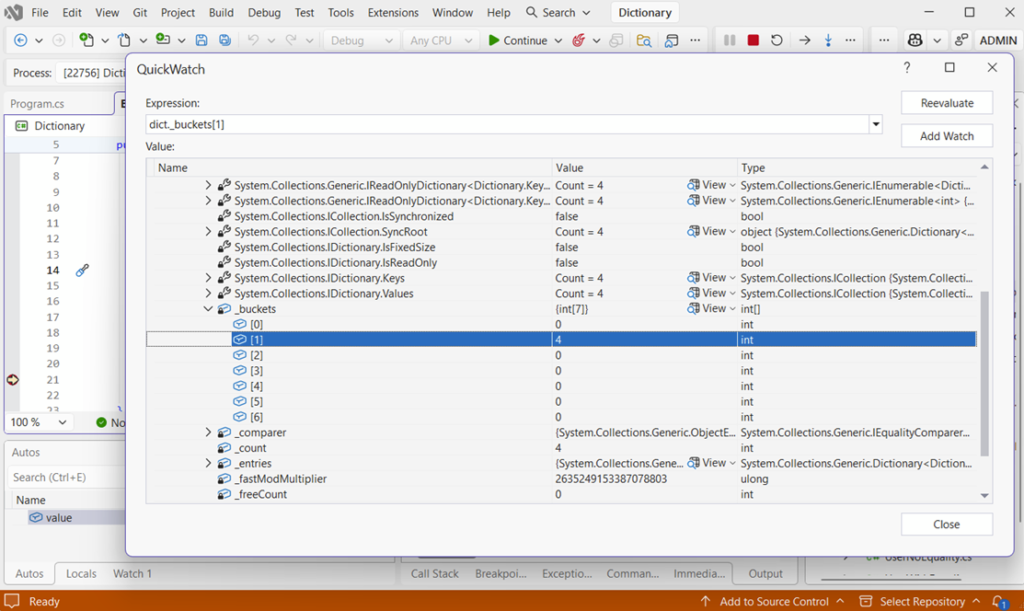
The _buckets item in the image is the internal array the dictionary uses to decide where entries go. Each index in _buckets points to the start of a chain of entries.
What Does [1] = 4 Mean?
Bucket 1 contains entries, and the chain starts at index 4 in the internal entries array.
All keys are landing in that first bucket – the collision in action!
Why Everything is in Bucket 1
The poorly-designed overridden method GetHashCode() forces everything into that particular bucket:
public override int GetHashCode()
{
    return 1;
}It’s important to remember that the _buckets array only shows where chains begin. There may be many more links in the chain.
Entries Are Linked Together
Actual entries live in another internal array called _entries, and they’re all linked together. Each entry has a next pointer to the next item in the chain:
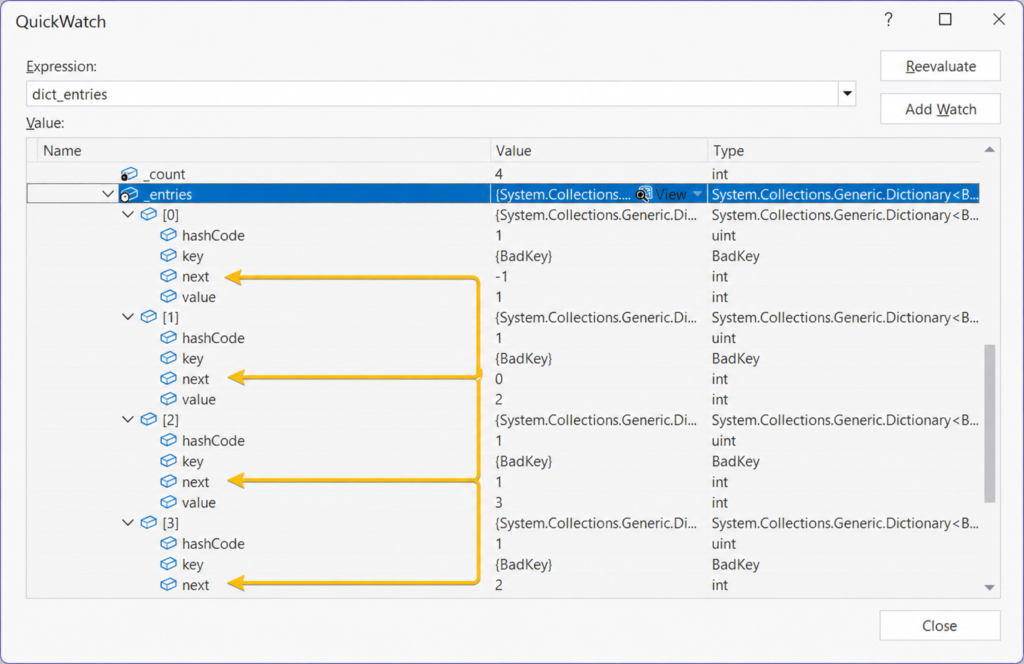
A next value of -1 indicates the end of the chain, as seen in position [0] of the array.
The full chain visible in the example above will be:
[3] -> [2] -> [1] -> [0] -> endThe key takeaway here is that buckets don’t store values, but rather they store the starting point of a linked list of entries and each entry links to the next using an index, with -1 marking the end.
Equality and Hash Codes in Dictionary
Everything we’ve looked at so far assumes that one thing is working properly: equality. And this is where most real-world dictionary issues start to experience problems.
A Dictionary<TKey, TValue> doesn’t just rely on hashing. It relies on a combination of GetHashCode() to find the bucket, and Equals() to confirm the match.
If either of those is wrong, the dictionary will either slow right down or behave incorrectly.
We’ve already seen what happens when hashing is poorly implemented, so let’s take a look at what happens when equality isn’t defined at all.
When Equality Isn’t Defined
Let’s take a look at what happens when equality isn’t defined.
Example two highlights a case where equality has not been overridden for use with a non-primitive type:
var dict = new Dictionary<UserNoEquality, string>();

var user1 = new UserNoEquality("test@test.com");
var user2 = new UserNoEquality("test@test.com");

// Add this item to the dictionary by using an arbitrary value
dict[user1] = "First";

Console.WriteLine(dict.ContainsKey(user2));Running the example code, the console outputs False:
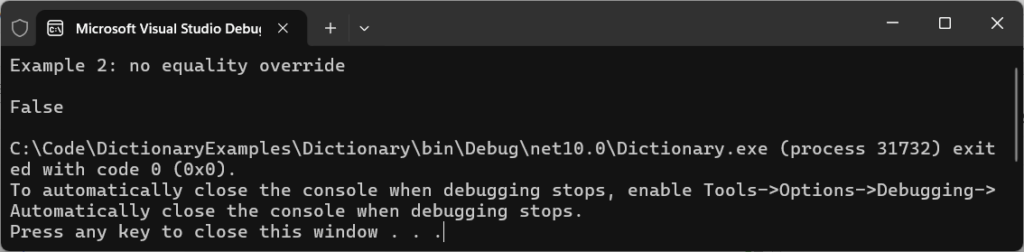
At first glance, it looks wrong because both user objects contain identical data. But from the dictionary’s perspective, they’re completely distinct.
Without overriding Equals and GetHashCode, the dictionary falls back to reference equality. That means that two objects are only equal if they are the exact same instance in memory.
It’s really easy to just assume two objects are the same, but what’s happening behind the scenes means they will never be equal.
That is, of course, unless we tell the framework exactly what equals means to us.
Fixing Equality Properly
Our third example uses much the same code as before:
var dict = new Dictionary<UserWithEquality, string>();

var user1 = new UserWithEquality("test@test.com");
var user2 = new UserWithEquality("TEST@test.com");

dict[user1] = "First";

Console.WriteLine(dict.ContainsKey(user2));
Console.WriteLine(dict[user2]);This time, we’ll properly implement equality to not only properly compare with other items in the dictionary, but also to ignore case.
Running it, the dict.ContainsKey(user2) has returned True, and the value of the match (“First”) has been printed in the console:

The difference now is that equality has been properly implemented in Keys\UserWithEquality.cs:
public override bool Equals(object? obj)
{
	return obj is UserWithEquality other &&
		   string.Equals(Email, other.Email, StringComparison.OrdinalIgnoreCase);
}

public override int GetHashCode()
{
	return StringComparer.OrdinalIgnoreCase.GetHashCode(Email);
}Now the dictionary can correctly identify that two separate instances represent the same logical value.
Note the StringComparison.OrdinalIgnoreCase being used to ignore case. This is useful in some scenarios, but normalising data before it’s placed in the dictionary is the more performant way to handle this scenario.
Mutable Keys
Even when we implement equality correctly, another common problem often surfaces in our fourth example:
var dict = new Dictionary<MutableUser, string>();

var user = new MutableUser("a@test.com");
dict[user] = "Stored";

Console.WriteLine($"Before changing object: {dict.ContainsKey(user)}");

// Change the key's email, which changes its hash code and equality behavior
user.Email = "b@test.com";

Console.WriteLine($"After email update: {dict.ContainsKey(user)}");Running the example shows what happens after an object is changed (mutated):

The reason for this is because the dictionary stored the key based on its original hash. When you change the value, the hash changes, but the dictionary has no way of knowing that. It doesn’t update on-the-fly.
The entry is still there internally, but it can no longer be found. And there’s no exception or warning, because technically nothing is wrong. This is why dictionary keys must always be treated as immutable (i.e., not changed).
If a key’s hash code changes after insertion, the dictionary doesn’t break – it just loses the ability to find it.
Avoiding Double Lookups
One of the ways we keep code performant in a general sense, is by ensuring it’s as lean as possible, avoiding unnecessary calls and lookups.
Let’s take a moment to consider what problems this code in example five presents:
if (users.ContainsKey(1)) // First lookup
{
    var value = users[1]; // Second lookup
    Console.WriteLine($"Two lookups: {value}");
}It works, but it performs two lookups. Use TryGetValue instead:
if (users.TryGetValue(1, out var user))
{
    Console.WriteLine($"TryGetValue: {user}");
}The result is identical, but the performance isn’t. Here’s the console output:

The difference is quite subtle: the first version calculates the hash and searches the bucket twice. The second does it once.
In isolation, it doesn’t matter too much. But in any hot path code that’s executed frequently, it starts to add up. It’s best to always avoid unnecessary lookups.
In extremely performance-sensitive scenarios, newer .NET versions also expose low-level APIs such as CollectionsMarshal.GetValueRefOrAddDefault, which can avoid additional dictionary lookups and unnecessary value copies. These APIs are powerful, but should be used carefully because they bypass some normal safety guarantees.
String Keys and Comparers
When string keys are compared in a dictionary they are, by default, case-sensitive.
Run the code for example number six:
var defaultDictionary = new Dictionary<string, string>();
defaultDictionary["Key"] = "value";

Console.WriteLine($"Default comparer: {defaultDictionary.ContainsKey("key")}");

var caseInsensitiveDictionary = new Dictionary<string, string>(StringComparer.OrdinalIgnoreCase);
caseInsensitiveDictionary["Key"] = "value";

Console.WriteLine($"OrdinalIgnoreCase comparer: {caseInsensitiveDictionary.ContainsKey("key")}");Note how the output of the console changes based on whether a string comparer is specified or not in the dictionary’s constructor:

In the example code we’re using StringComparer.OrdinalIgnoreCase, but choose the option that best fits your use case.
It can be tempting to simply normalise your strings using extension methods such as ToLower(), but remember from my earlier post on C# String Comparison: Performance, Culture, and Hidden Costs that this comes at a performance cost and can be overkill if your application isn’t culture-dependent.
Capacity and Resizing
One thing that’s easy to forget is that dictionaries grow dynamically.
When the internal storage fills up, the dictionary allocates a larger structure and rehashes every existing entry into the new buckets. And that operation is relatively expensive.
Most of the time, it doesn’t matter. But if you’re building large dictionaries repeatedly or processing significant amounts of data, those resize operations can become noticeable and hit performance.
If you know roughly how many items you’ll store, it’s worth setting the capacity upfront, as shown in our seventh example:
const int expectedUsers = 1_000;
var users = new Dictionary<int, string>(expectedUsers);

for (var i = 1; i <= expectedUsers; i++)
{
	users[i] = $"User {i}";
}

Console.WriteLine($"Users added: {users.Count}");At first glance, running the code appears unremarkable:

But internally, it avoids repeated resizing operations as the dictionary grows in size.
Without a predefined capacity, the dictionary repeatedly:
- Allocates larger bucket arrays
- Reallocates internal entry array
- Recalculates hashes
- Repositions entries
When you already know the approximate size, giving the dictionary that information upfront avoids all of that extra work.
In larger systems, allocations and resizing overhead all starts to add up. And if your dictionary becomes effectively read-only after creation, that’s exactly the kind of scenario where something like FrozenDictionary becomes interesting: FrozenDictionary in C#: Supercharging Redirect Lookup Performance.
Why Dictionaries Are So Fast
Previous examples have given you a good idea of how dictionaries behave internally, but we haven’t really demonstrated the practical payoff yet.
Quite simply, the entire reason dictionaries exist is their ability to perform super-fast key-based lookups.
Here’s the code from our eighth and final example, where List and Dictionary lookups are compared:
var list = Enumerable.Range(1, 1_000_000).ToList();
var dict = list.ToDictionary(static x => x);

var stopwatch = Stopwatch.StartNew();
_ = list.Contains(999_999);
stopwatch.Stop();
Console.WriteLine($"List lookup: {stopwatch.ElapsedTicks} ticks");

stopwatch.Restart();
_ = dict.ContainsKey(999_999);
stopwatch.Stop();
Console.WriteLine($"Dictionary lookup: {stopwatch.ElapsedTicks} ticks");By setting a stopwatch, we can get a very basic idea of how long each lookup takes to complete. Running the code, the console output contrasts the two examples:

The exact numbers you see will vary. Machine spec, runtimes, and even individual runs will cause some variance in these figures, but the relative behaviour will be the same and Dictionary will generally outperform linear scans once collections become moderately sized or lookups become frequent.
The reason for this is because lists perform linear scans through their collections until a value is found. Dictionaries calculate a hash code and use it to locate the correct bucket, allowing lookups to avoid scanning the entire collection.
Modern .NET implementations preserve insertion order during enumeration, but this behaviour was not guaranteed in older runtimes and should not always be relied upon as a contractual API guarantee.
All of the hashing, equality, bucket distribution, and collision handling exist to preserve that fast lookup behaviour.
Remember, though: Once collisions become excessive or equality is implemented incorrectly, that advantage can quickly disappear.
If you want to take the next step and perform some production-tier benchmarking, check out my post on BenchmarkDotNet in .NET 10: Step-by-Step with 5 Real C# Benchmarks. It explains how to use it in detail, and will give you much more accurate numbers than the ‘ticks’ used here.
When Dictionary is the Right Choice
Make Dictionary<TKey, TValue> your go-to for applications that involve frequent lookups, unique keys, and where retrieval speed matters.
You’ll see them appear everywhere in solutions such as caching, routing, ID lookups, and state tracking. But like every collection, there are always trade-offs.
If your primary operation is iteration, streaming, or sequential processing, a dictionary can actually introduce unnecessary complexity and memory overhead.
For large streaming scenarios, something like IAsyncEnumerable is often a better fit. I explored that in more detail here:
The important thing is understanding why you’re choosing a particular structure rather than simply defaulting to one you’re most familiar with.
Do remember, too, that Dictionary<TKey, TValue> is not thread-safe for concurrent writes. Use ConcurrentDictionary<TKey, TValue> for multi-threaded mutation scenarios.
Final Thoughts
It’s easy to forget the complexity that sits beneath every one of your dictionary declarations. Hashing, bucket allocation, collision resolution – the list goes on. And most of the time, you never need to think about any of it.
But when performance matters, or when bugs creep into production, understanding how dictionaries actually work becomes really valuable.
The biggest takeaway here isn’t that dictionaries are fast, but the understanding of why they’re so fast – and what we need to do to keep them that way.
Once you understand that, you’ll start making better decisions about when to use them.