


Table of Contents
Redirect handling seems trivial until it suddenly isn’t. When implementing FrozenDictionary in C#, it quickly becomes clear that even small inefficiencies in redirect lookups can have a measurable impact at scale.
At small scale this kind of logic feels inconsequential. But in high-traffic systems even a few extra microseconds inside a request pipeline compound rapidly. Across tens of thousands of lookups per second, even small differences in lookup cost can add measurable latency. At thousands of requests per second that becomes real infrastructure cost, slower page loads, and potentially reduced crawl efficiency for search engines.
During a recent migration project the question was posed over how to handle 10,000 legacy URLs that all needed redirecting to their new locations.
Every request to the new site now had to answer a simple question:
Does this URL need redirecting?
When that check runs on every request, even minuscule inefficiencies quickly become an expensive problem.
And what’s more, it needs to be done with precise attention to detail to avoid damaging brand authority signals in search engines.
The Problem: 10,000 Redirects
Let’s consider a common problem: a recent website migration project reveals over 10,000 redirects are needed to prevent inbound links to old content resulting in a 404 as they will no longer exist. You’ve been given a spreadsheet of all the old URLs and provided new destinations for them to be redirected to.
For this demo, we’re going to load those 10,000 redirects into memory at application startup and check every request to see if it needs to be redirected. There are many options available, which we’ll look at later in the post, but we’ll assume a really specific workload for benchmarking the quickest solution:
- Build the list once by loading it into memory;
- Read on nearly every request;
- And rarely update it (i.e., it won’t be constantly mutated).
This workload pattern is important because it mirrors many real production systems. Configuration data, routing tables, feature flags, and redirect mappings often follow the same lifecycle: constructed once during startup, then accessed constantly by read-heavy request pipelines. That makes them ideal candidates for specialised read-optimised data structures.
That creates a perfect scenario for measuring how FrozenDictionary in C# compares with both a regular Dictionary or a List in .NET 10.
In this post, we’ll examine why redirect lookups can become performance bottlenecks all too easily, and how much the smallest of performance differences can make a huge difference with production workloads. I’ll also explain why normalising URLs earlier in the pipeline matters more than you might think.
All code used in this article is available in my FrozenDictionary Redirects Demo GitHub repository. Follow along and run your own benchmarking – post your results in the comments!
Redirects: An Interesting Performance Problem
On the surface, redirect lookups appear trivial. But when they sit inside a hot request path, their cost multiplies quickly.
if (redirects.TryGetValue(path, out var destination))
{
    return Redirect(destination);
}But in reality, they are messy. Links often contain trailing slashes, inconsistent casing, duplicate slashes, and query strings. It’s rarely a case of the perfect A-to-B scenario, and some level of normalisation is needed in the redirect pipeline to ensure requests are routed consistently and correctly.
Happy path redirect lookup pipeline:

Notably, it’s the normalisation step that can easily dominate the cost of a lookup. When benchmarking redirect performance, it’s important to test two scenarios:
- Lookup only – measuring the collection itself.
- Normalisation plus lookup – representing a real request pipeline.
Both of these paths are included in the benchmarks below.
What is FrozenDictionary?
The FrozenDictionary<TKey,TValue> lives in the System.Collections.Frozen namespace, which was introduced in .NET 8.0 in late 2023. It’s not “new” but it fits a variety of applications that you’ll come across every day, following the mantra “build once, read many times”.
Unlike a normal Dictionary, it becomes immutable the moment it is created. That allows the runtime to optimise its internal layout for extremely fast lookups. Internally, the runtime can optimise hashing and bucket placement once the dataset is known to be immutable.
But there are trade-offs to consider:
| Operation | Dictionary | FrozenDictionary |
| Build time | Faster | Slower |
| Lookup time | Fast | Faster |
| Mutability (i.e., can be modified) | Mutable | Immutable |
If you have a collection that’s loaded once at application startup and then accessed constantly, the FrozenDictionary becomes a strong candidate. For our redirect table scenario and use case, it’s just what it was designed for.
Why FrozenDictionary Can Be Faster
When a normal Dictionary is created it must support insertions, deletions, resizing, and rehashing. That flexibility introduces overhead because the internal structure must remain mutable.
FrozenDictionary removes that requirement entirely. Once constructed, the collection is immutable. That allows the runtime to pre-compute optimal bucket layouts and remove defensive logic required for mutation.
In practical terms this means:
- No resizing;
- No rehashing;
- No mutation checks;
- More predictable memory layout.
The result is slightly faster lookups and improved branch predictability for repeated reads.
Redirects Demo Solution
The example solution contains three small projects:
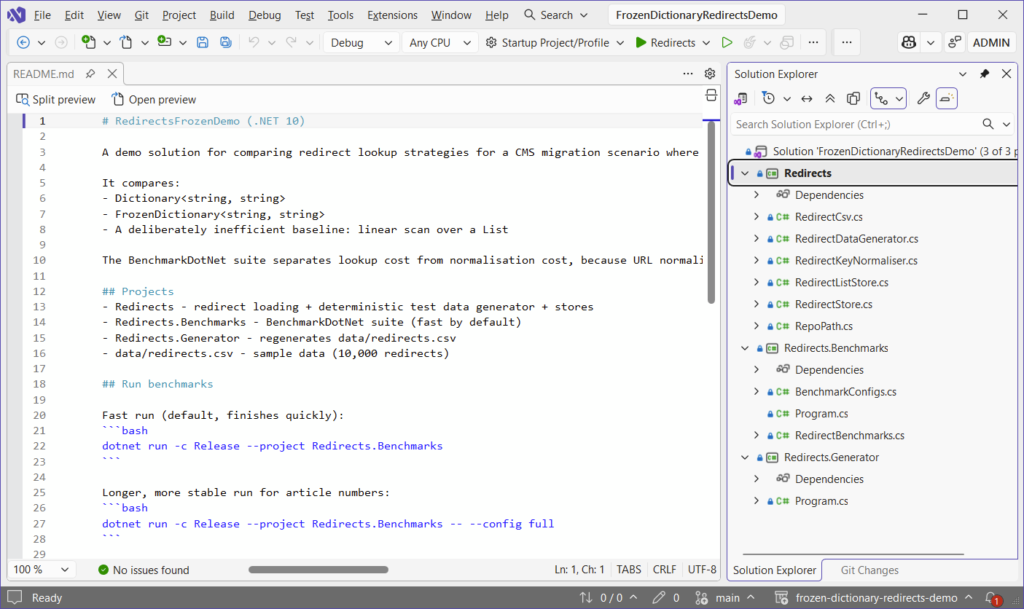
Redirects contains the code for building and normalising redirects, with data ingested from a CSV file.
Redirects.Generator populates the data\redirects.csv file with 10,000 simple and complex redirects.
Redirects.Benchmarks uses BenchmarkDotNet to produce the numbers and analyse which type of list comes out on top.
Generating Realistic Redirect Data
To simulate a real website migration scenario, the generator intentionally creates messy URLs with issues such as inconsistent casing, missing and duplicate slashes, tracking parameters, and fragments.
By default, it will generate 10,000 redirects and populate the redirects.csv file, but you can increase this number for your own benchmarking:
foreach (var (source, destination) in RedirectDataGenerator.Generate(count: 10_000))
{
    sb.Append(source)
      .Append(',')
      .Append(destination)
      .AppendLine();
}Here’s an example of what the redirects.csv looks like after running Redirects.Generator:

Example CSV output will include a variation of real-world addresses:
blog/2014/02/17/performance-benchmarks-123
/BLOG/2018/05/12/DOTNET-MIGRATION-456/
docs//2020/03/08/frozen-dictionary-789?utm_source=legacyNormalising Redirect Keys
Before storing redirects are loaded into memory, paths are normalised to ensure consistency:
public static string Normalise(string rawPath)
{
	if (string.IsNullOrWhiteSpace(rawPath))
		return "/";

	var p = rawPath.Trim();

	var q = p.IndexOf('?', StringComparison.Ordinal);
	if (q >= 0) p = p[..q];
	var h = p.IndexOf('#', StringComparison.Ordinal);
	if (h >= 0) p = p[..h];

	if (!p.StartsWith("/", StringComparison.Ordinal))
		p = "/" + p;

	p = CollapseDoubleSlashes(p);

	if (p.Length > 1 && p.EndsWith("/", StringComparison.Ordinal))
		p = p[..^1];

	return p;
}This ensures that any redirect keys stored in the dictionary are canonical for the purposes of the demo application.
Normalise Data Before it Reaches Your Application
In real-world systems we should aim to normalise redirect keys before they reach the application.
If the CSV used to generate redirect mappings is pre-normalised during export, then the runtime system does not need to repeatedly perform trimming, casing or canonicalisation on every request.
In practice this might mean:
- Lowercasing URLs during CSV generation;
- Removing trailing slashes during data export;
- Ensuring consistent path formatting before loading redirects.
Moving this work outside the request pipeline ensures the redirect lookup itself remains extremely cheap.
The Importance of Normalisation
When working on website migration projects, redirect rules typically originate from a number of sources, such as CMS exports, spreadsheets, and content audits. That means we are usually in control of the pipeline that generates the CSV.
In the real world, we should normalise any input before it reaches the application – not primarily at runtime, because the operation is expensive and unpredictable. In many redirect systems the cost of normalising the incoming URL can actually exceed the cost of the dictionary lookup itself. String allocations, trimming operations and case conversions can quickly dominate the request pipeline if they are executed for every request.
Instead of storing inconsistent URLs like these:
BLOG//2020/03/08/FROZEN-DICTIONARY-789/?utm_source=legacy
/about/
/ABOUT
docs//guide//We should canonicalise them before loading:
/blog/2020/03/08/frozen-dictionary-789
/about
/docs/guideThis results in simpler redirect tables with easier duplicate detection. And it also means there is less work to be carried out at runtime, resulting in more predictable behaviour and saving on performance cost.
Even so, it’s still good practice to keep a normalisation step during import as a safety net. In the demo app, it’s run for every row of the import:
foreach (var (src, _) in _rows)
keys.Add(RedirectKeyNormaliser.Normalise(src));If the CSV is already canonical, the normaliser returns immediately.
Normalisation is often the hidden cost in redirect systems. If every incoming request requires string allocations, casing operations, and trimming before lookup, the cost of that pre-processing can exceed the cost of the dictionary lookup itself.
In other words, optimising the collection but ignoring the pre-processing pipeline can lead to misleading performance conclusions.
Building the Redirect Stores
The redirect store first constructs a standard dictionary:
var dict = new Dictionary<string, string>(
    capacity: capacityHint,
    comparer: StringComparer.OrdinalIgnoreCase);

foreach (var (source, destination) in rows)
{
    var key = RedirectKeyNormaliser.Normalise(source);
    dict[key] = destination;
}The frozen dictionary is then built from it:
var frozen = dict.ToFrozenDictionary(StringComparer.OrdinalIgnoreCase);This keeps the simplicity of Dictionary during construction, then benefits from the faster reads afterwards.
The Deliberately Bad Baseline
The demo also contains a list-based lookup implementation for reference and benchmarking against:
public bool TryGet(string normalisedPath, out string? destination)
{
    for (var i = 0; i < _rows.Count; i++)
    {
        var (src, dest) = _rows[i];

        if (string.Equals(src, normalisedPath, StringComparison.OrdinalIgnoreCase))
        {
            destination = dest;
            return true;
        }
    }

    destination = null;
    return false;
}It performs a linear scan, meaning each lookup is O(n) and becomes extremely expensive as redirect counts increase. You can read more about how performance differs across different types of collections (alongside some tables and charts) in my HashSet in C# post.
Running the Benchmarks
Benchmarks were executed using the following commands in BenchmarkDotNet.
Quick run:
dotnet run -c Release --project Redirects.BenchmarksFull run:
dotnet run -c Release --project Redirects.Benchmarks --config fullWhichever one you choose, BenchmarkDotNet will run to completion and display results in a table similar to the one below:
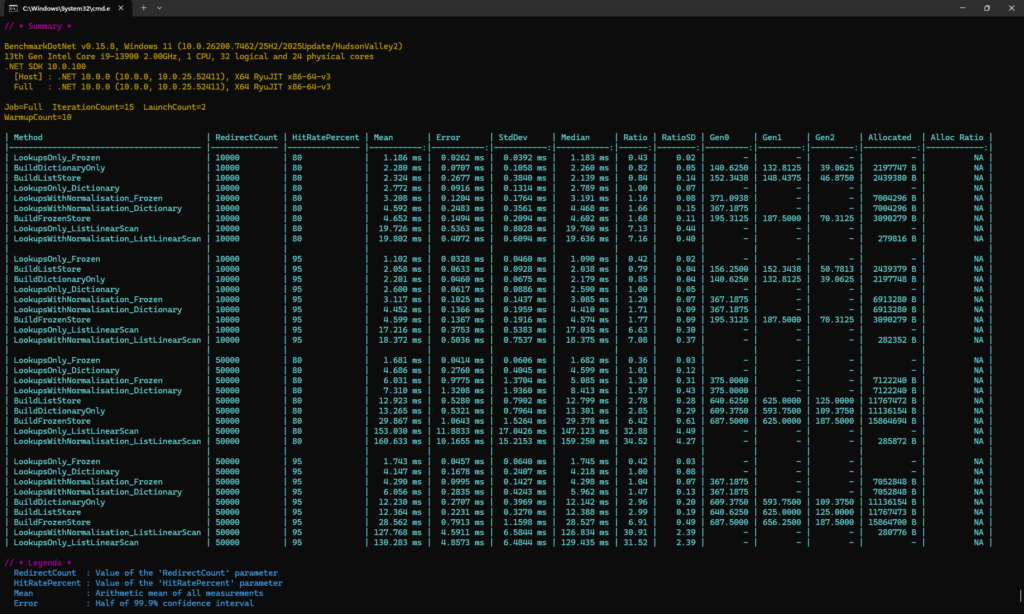
It may take a long time to execute the full run, depending on your system specs.
It’s worth noting that a subtle factor influencing lookup speed is CPU cache locality. Because redirect tables are accessed repeatedly, the relevant portions of memory often remain resident in L1 or L2 cache. Immutable collections such as FrozenDictionary can benefit from this behaviour because their layout never changes after construction.
Benchmark Results
Results for this demo were produced in BenchmarkDotNet 0.15.8 using .NET 10, with an Intel i9-13900 on Windows 11.
View them in full in a friendly markdown format in the GitHub repository:
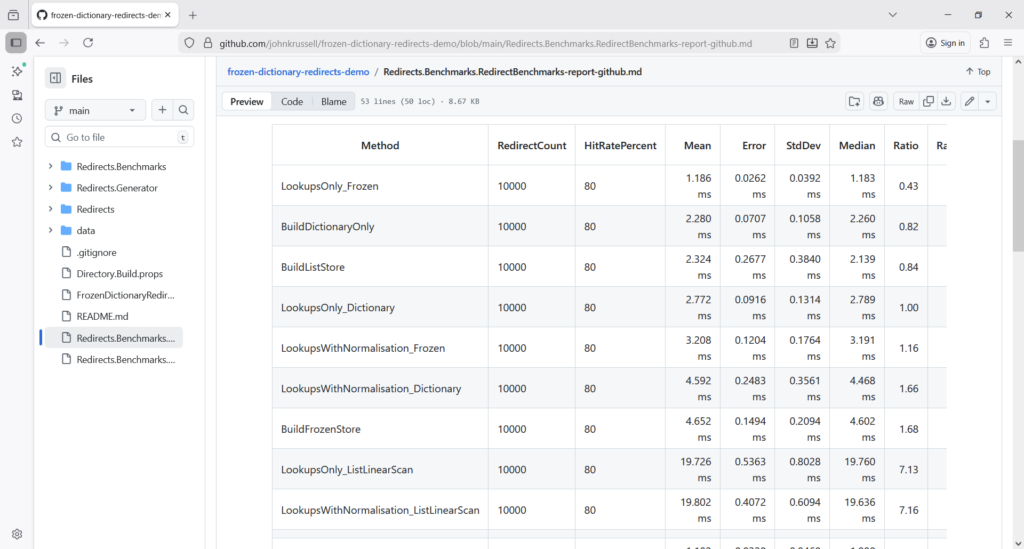
Lookup Performance
| Number of Redirects | Dictionary | FrozenDictionary | Speed |
| 10,000 | 2.77ms | 1.18ms | 2.3x faster |
| 50,000 | 4.69ms | 1.68ms | 2.8x faster |
Including Normalisation
When normalisation is included the gap narrows. FrozenDictionary still wins, but the margin is much smaller:
| Number of Redirects | Dictionary | FrozenDictionary | Speed |
| 10,000 | 4.59ms | 3.20ms | 1.4x faster |
| 50,000 | 7.31ms | 6.03ms | 1.2x faster |
This actually reveals something important: the next optimisation target isn’t the dictionary, but rather the string processing in the normalisation step.
Memory Allocations
Focusing on the 50,000 lookup, normalisation benchmarks allocate roughly 7MB per benchmark operation. That equates to roughly 140 bytes per lookup (reached by dividing 7,000,000 by 50,000), and highlights how string processing can generate measurable Garbage Collector (GC) pressure.
Algorithmic Complexity Matters
Redirect lookup performance is fundamentally determined by algorithmic complexity.
When evaluating data structures it’s important to understand if or how lookup cost grows as the dataset increases. A solution that appears fast with a few hundred entries can become dramatically slower and less performant once the dataset grows into the tens of thousands.
In the redirect benchmarks in this post, with 50,000 redirects loaded, a dictionary lookup completed in 4.69ms, while a linear scan through a List<T> took 153ms – that’s over 32x slower.
This behaviour’s explained by the underlying algorithmic complexity of the data structures:
| Data Structure | Lookup Complexity |
| List / Array | O(n) |
| Dictionary | O(1) |
| FrozenDictionary | O(1) |
A list-based lookup requires scanning elements sequentially until a match is found. As the collection grows, the number of comparisons required grows linearly (O(n)).
Hash-based collections such as Dictionary instead compute a hash of the key and jump directly to the appropriate bucket. This results in constant-time lookup behaviour, regardless of the size of the collection.
FrozenDictionary retains the same theoretical complexity as Dictionary, but optimises the internal structure during construction to make repeated read operations faster.
See below a chart from my previous article on C# HashSet performance, which illustrates how lookup performance differs across common collections when using the .Contains() method.
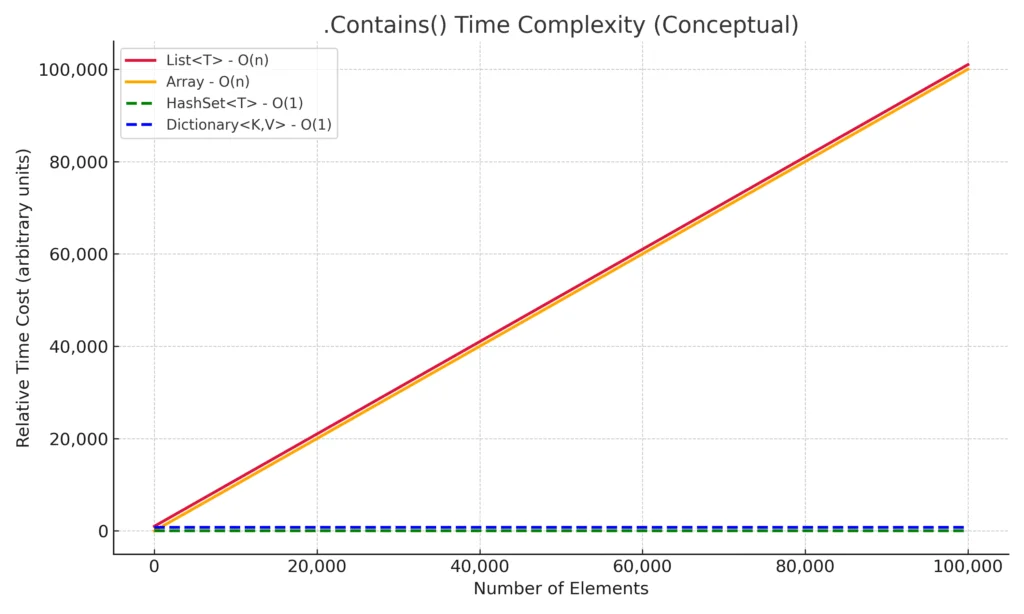
The dashed lines represent constant-time performance as the number of elements grows.
The green (HashSet<T>) and blue (Dictionary<K,V>) lines remain flat, showing that lookup cost stays effectively constant.
In contrast, the red and orange lines (List<T> and Array) climb steadily as the dataset grows. These data structures require scanning elements sequentially, meaning lookup cost increases linearly with collection size.
In other words: Choosing the wrong data structure doesn’t just make code a little slower – it can fundamentally change how the system scales.
The important takeaway here is not simply that dictionaries are faster. It is that the shape of the performance curve changes.
An O(n) lookup cost means performance degrades linearly as the dataset grows. A redirect table of 100 entries might appear perfectly acceptable when implemented using a list, but at 10,000 entries the difference becomes significant, and at 100,000 entries it becomes catastrophic.
This is why selecting the correct data structure early in system design is so important. Performance problems caused by algorithmic complexity rarely appear in small development datasets but surface quickly in production environments.
What About Redis?
Redis (Remote Dictionary Server) is an in-memory data structure store, which can act as an extremely fast database and cache. So would it make sense to use it in our redirects scenario?
It could be a viable option when:
- Redirects are shared across many application instances;
- Redirect rules need to update dynamically (and frequently);
- Central management is needed.
But it brings its own set of problems, such as network latency and operational complexity. Don’t take my word for it, give it a go yourself and let me know how you get on in the comments.
For super-hot paths, like our redirects, local in-memory FrozenDictionary will almost always be faster.
That said, Redis introduces network latency into the request path. Even on fast internal networks this can add hundreds of microseconds to each lookup.
For redirect tables that comfortably fit in memory, an in-process data structure will almost always outperform a network round-trip.
Redis becomes more attractive when:
- Redirect tables exceed available memory;
- Multiple application instances must share a central redirect store;
- Redirects are updated frequently without restarting the application.
Why FrozenDictionary’s Ideal for Redirect Lookups
FrozenDictionary can absolutely excel in scenarios where you need exceptionally fast in-memory reads like with our redirect solution.
Benchmarking reported 2-3x faster lookups, slim startup overhead, and superb scaling as redirect counts grow. But if you’re really looking to supercharge your redirect solution, take a blended approach of:
- Implementing
FrozenDictionary; - Canonicalising redirect inputs before the application loads them into memory;
- And minimising runtime normalisation work as much as possible.
Making sure to cover all three bases will set your solution up for a scalable future.
Final Thoughts
Redirect lookups might seem like a trivial concern at first, but they illustrate a broader lesson in systems design: the data structures chosen in hot paths matter enormously. And not just with redirects – with many lines of common code you write each day.
For read-heavy workloads where data is constructed once and accessed constantly, FrozenDictionary is a win for performance optimisation. It sacrifices mutability in exchange for faster lookups and predictable performance characteristics.
Equally important is recognising where performance actually comes from. In our benchmarks the biggest improvements came not from the collection itself, but from eliminating unnecessary work in the request pipeline – particularly URL normalisation.
Choose the right data structure, remove unnecessary pre-processing, and keep hot paths simple. And remember: the less work your application has to do, the faster it’ll be.
You can explore the full implementation and run the benchmarks yourself in the accompanying repository: FrozenDictionary Redirect Demo.